Python's pty.spawn() demystified
When I saw pty.spawn() for the first time, I thought “ok so it starts a new process in a new PTY. Easy.” The implementation, however, was far from simple. For example in this simple gist:
$ python3 py_pty_simple.py
[PARENT] Spawning child in PTY...
[CHILD] Running in PTY, press Ctrl+C...
^C
[CHILD] Caught SIGINT, exiting...
[PARENT] pty.spawn() returned, press Ctrl+C...
^C
[PARENT] Caught SIGINT, exiting...
A couple of things weren’t immediately clear:
- How does the child process able to receive the signal and bypass the parent process?
- How does the child process able to write to the terminal that the parent process is attached to if it’s in a different PTY?
This post will go over how it works under the hood.
What is PTY?
Pseudo-terminal (PTY) is a virtualization of the legacy teletype (TTY) hardware. It consists of a pair of character devices: leader & follower (or master & slave). The pair acts as a bidirectional channel. All writes to the device files are handled by the kernel’s TTY driver & line discipline before being passed to the reading side. Line discipline interprets special characters (e.g. converting CTRL-C to SIGINT).
Terminal emulators (e.g. iterm2, ghostty, etc) use pty leader to send & receive data to print to the GUI. The process running in the shell reads & writes data from its pty follower. Multiple processes can share the same pty follower through forking.
Here’s an example diagram when i run python3 -c "import time; time.sleep(100)" in a zsh shell:

Notice how python process shares the same pty follower as the parent zsh process since it was forked.
This topic alone deserves its own blog series, so read the reference materials below for more deep dive:
- “What is a Terminal Emulator? Understanding ’ls’ Command”
- “Understanding the tty subsystem: Overview and architecture”
Code walk through
Now let’s walk through the source code of pty.spawn() from Python 3.13 step by step.
fork & openpty
def spawn(argv, master_read=_read, stdin_read=_read):
    ...
    pid, master_fd = fork()
    if pid == CHILD:
        os.execlp(argv[0], *argv)


def fork():
    ...
    master_fd, slave_fd = openpty()
    pid = os.fork()
    if pid == CHILD:
        os.close(master_fd)
        os.login_tty(slave_fd)
    else:
        os.close(slave_fd)

    # Parent and child process.
    return pid, master_fd
One of the first things it does is to call a fork() method from the same module (not the os.fork()). Before the process forks a child process, it calls openpty() to open a new set of pty pairs. Afterwards, it executes the command it was passed in via the argv[0] param in the child process. Here’s a diagram showing the pty pairs (pty pairs are color coded) after calling pty.spawn() from the Python process:

termios
    ...
    try:
        mode = tcgetattr(STDIN_FILENO)
        setraw(STDIN_FILENO)
        restore = True
    except tty.error:    # This is the same as termios.error
        restore = False
Next, the code manipulates the terminal configuration. These methods are from termios which is a C API to manipulate line discipline behavior. It saves the current configuration into a mode variable (which is used later). It then sets the pty follower that stdin is connected to into raw mode.
When a pty follower is in raw mode, it disables most line discipline features. It then passes the data as is to the receiving end. This means that the line discipline will no longer process CTRL-C key press as SIGINT for this pty follower (shown in red).

For example, here’s what happens when you set one shell to raw mode using two shell sessions:
                 tty1                |             tty2
  -----------------------------------------------------------------
  $ tty                              |
  /dev/tty001                        |
                                     |
                                     | $ stty -f /dev/ttys001 raw
                                     |
  # Press CTRL-C                     |
  # No SIGINT sent - just prints ^C  |
  $ ^C                               |
See “A Brief Introduction to termios” for more info about termios.
_copy
    ...
    try:
        _copy(master_fd, master_read, stdin_read)
It then calls the _copy() method which is the most complicated part. The parent Python process calls select() on stdin (fd 0, nconnected to the original pty follower) and on the new pty leader fd. The parent process becomes responsible for passing data between the two. This part is complicated so let’s examine incoming and outgoing data cases separately.
Incoming

The parent process invokes the stdin_read callback on incoming data from stdin. By default, it runs os.read(fd, 1024). The data returned from stdin_read is then written to the pty leader (/dev/ptmx on MacOS), which gets piped to the new pty follower (in this case /dev/tty002).
This may seem overly complicated, but it makes sense when we understand how it handles SIGINT. In a scenario where we run pty.spawn(), when we press CTRL-C in the terminal we probably intend to send the SIGINT to the child process. Because we set the line discipline of the original pty follower (in this case /dev/tty001, connected to stdin) to raw mode, the parent Python process doesn’t receive SIGINT from the kernel. Instead, the \x03 data (ASCII for CTRL-C) is read by stdin_read to be passed to the 2nd pair of ptys. When the new pty follower (/dev/tty002) receives the \x03, the kernel instead sends SIGINT to the child process as expected.
Outgoing

Similarly when the data is outgoing from the new pty follower pair, it’s read by the parent Python process to be handled with the master_read param function.
TTY restoration
    ...
    try:
        _copy(master_fd, master_read, stdin_read)
    finally:
        if restore:
            tcsetattr(STDIN_FILENO, tty.TCSAFLUSH, mode)
When the _copy method returns after either file descriptors receive EOF, it restores the previous TTY setting saved in the mode variable by using termios tcsetattr. Afterwards, it runs resources cleanup code not included here.
The earlier python gist demonstrates the TTY setting restoration:
$ python3 py_pty_simple.py
[PARENT] Spawning child in PTY...
[CHILD] Running in PTY, press Ctrl+C...
^C
[CHILD] Caught SIGINT, exiting...
[PARENT] pty.spawn() returned, press Ctrl+C...
^C
[PARENT] Caught SIGINT, exiting...
When the first ^C is received, you see that the signal bypasses the parent process TTY since it’s in raw mode. After the child process exits, the 2nd ^C is correctly handled by the parent’s process’s signal handler after the TTY settings were restored.
That’s it for pty.spawn()!
TTY routing
A keen reader might notice something odd on MacOS. While pty followers are always named with the pattern /dev/ttyXXX, the /dev/ptmx character device file is used as the pty leader for both pairs.
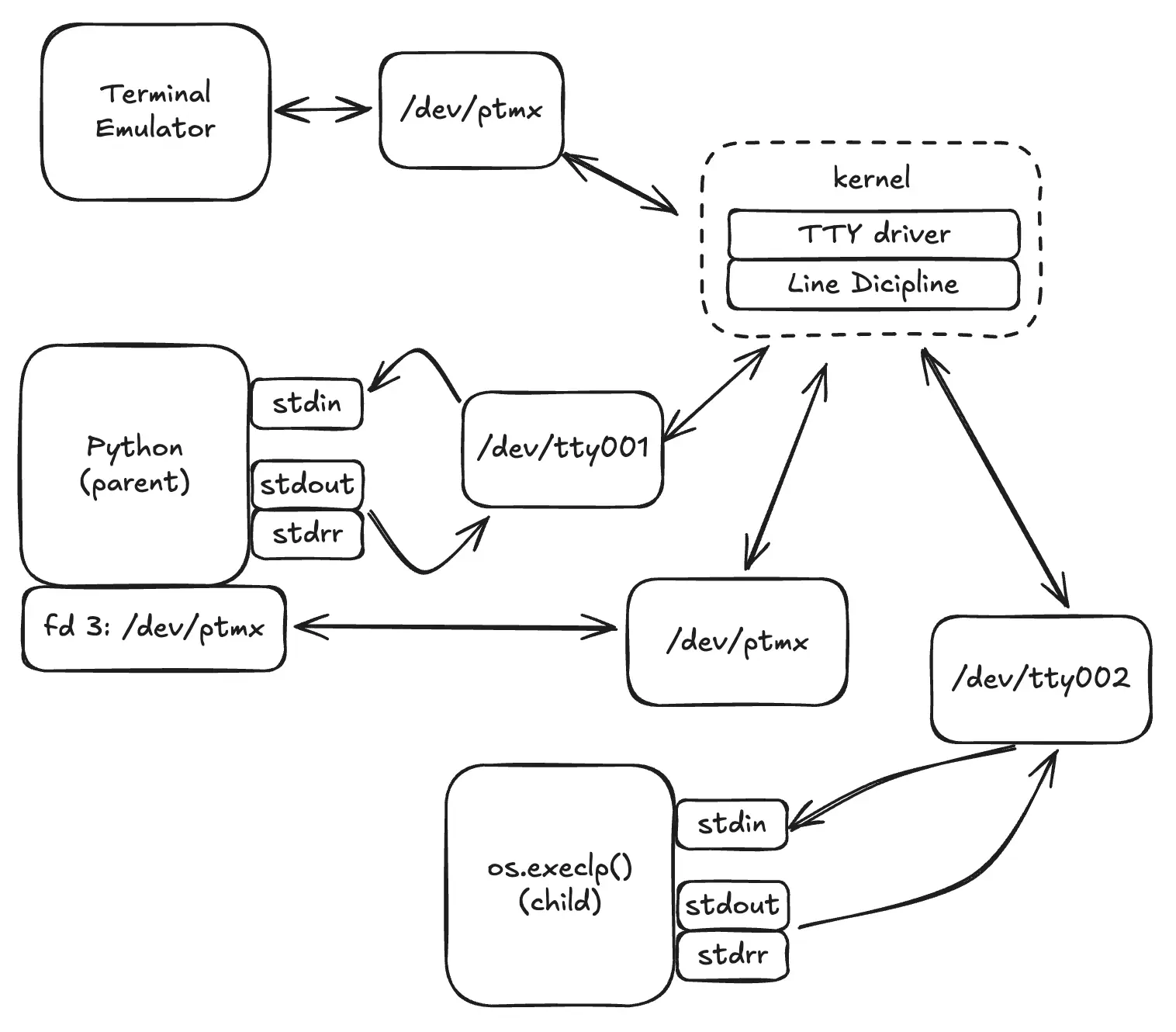
This stackexchange answer explains that it is due to the implementation of the openpty() function. Internally, the kernel keeps track of all pty pairs, and distinguishes each one based on the minor number of the character device file. Here’s an example from the earlier Python script on my machine:
$ lsof -p 4094 | awk "NR == 1 || /dev/" # parent process
COMMAND  PID    USER   FD   TYPE DEVICE SIZE/OFF                NODE NAME
Python  4094 atsushi    0u   CHR   16,1  0t79457                 895 /dev/ttys001
Python  4094 atsushi    1u   CHR   16,1  0t79457                 895 /dev/ttys001
Python  4094 atsushi    2u   CHR   16,1  0t79457                 895 /dev/ttys001
Python  4094 atsushi    3u   CHR   15,2    0t248                 605 /dev/ptmx
$ lsof -p 4095 | awk "NR == 1 || /dev/" # child process
COMMAND  PID    USER   FD   TYPE DEVICE SIZE/OFF                NODE NAME
Python  4095 atsushi    0u   CHR   16,2    0t240                 997 /dev/ttys002
Python  4095 atsushi    1u   CHR   16,2    0t240                 997 /dev/ttys002
Python  4095 atsushi    2u   CHR   16,2    0t240                 997 /dev/ttys002
For example, when data is written to /dev/ptmx with the device number 15,2, the kernel routes it to /dev/tty002, which has the matching minor device number (the 2 in 16,2 matches across both devices).
Summary
pty.spawn() is surprisingly complicated. The documentation describes this whole behavior in a couple paragraphs, but the details completely went over my head when I first read it. Let me know if it was helpful or if you find any issues!