Cypress vs Playwright: Architecture deep dive
While researching the differences between Cypress and Playwright, I was surprised by the lack of articles covering their architectures. Most of the articles were either not in-depth enough or slightly outdated. This is my attempt to document what I learned. We’ll cover Cypress first, then Playwright, then compare both in terms of performance and flakiness.
Cypress architecture
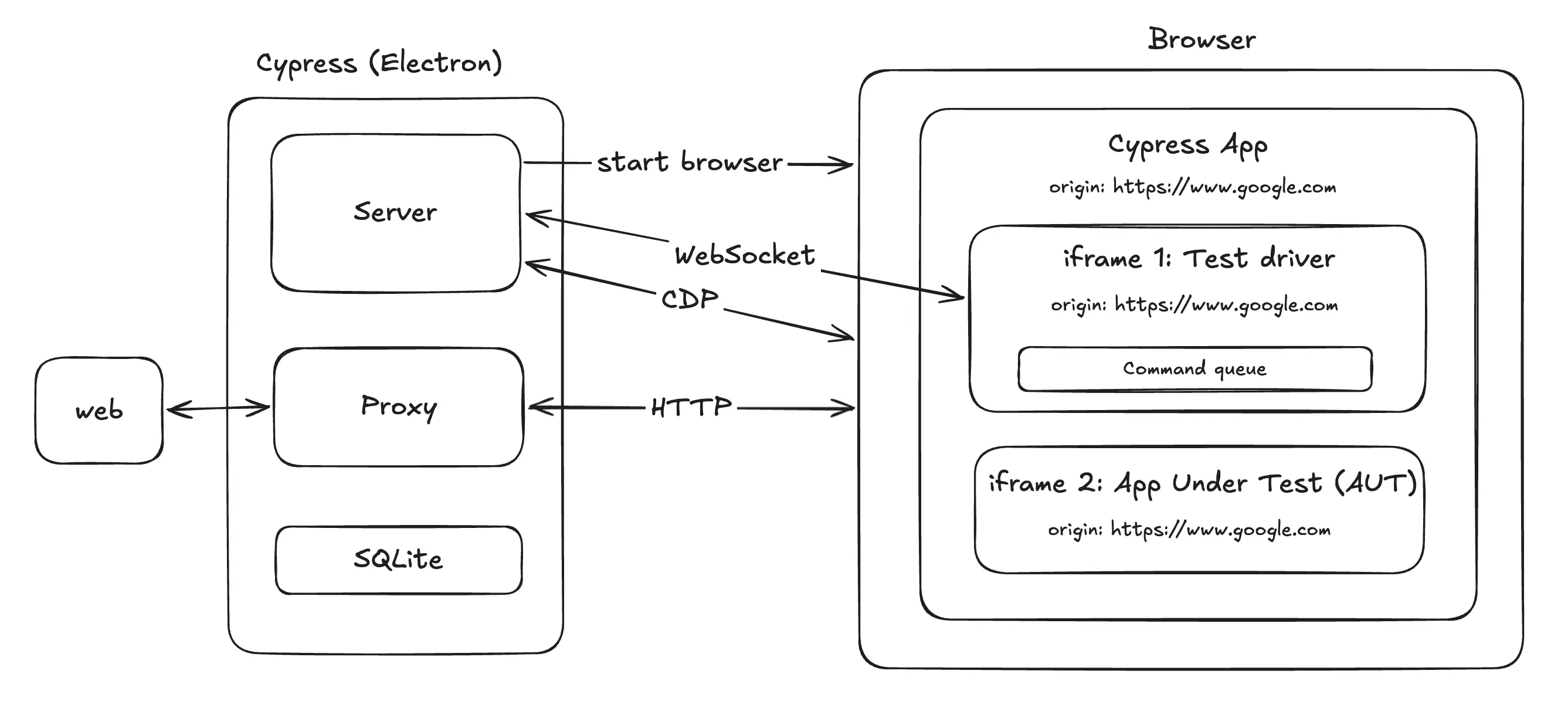
Cypress has three major components (based on v15.13.0):
- Cypress Server: Orchestrates the whole Cypress workflow (e.g. file management, browser lifecycle, task execution, etc.)
- Browser: Runs three windows (Cypress App, Test driver, and the App Under Test (AUT))
- Proxy: Intercepts all HTTP requests from the browser
Cypress server and proxy are part of the Electron app (which was surprising to me, but here’s the GitHub issue about it). On browser start, the server sets the proxy via the browser configuration. The --proxy-server flag is used in Chrome and session.SetProxy is used for Electron.
The server uses SQLite to store state. This includes both cy.session() and creating a separate .db file per test suite.
Demo: Cypress Electron
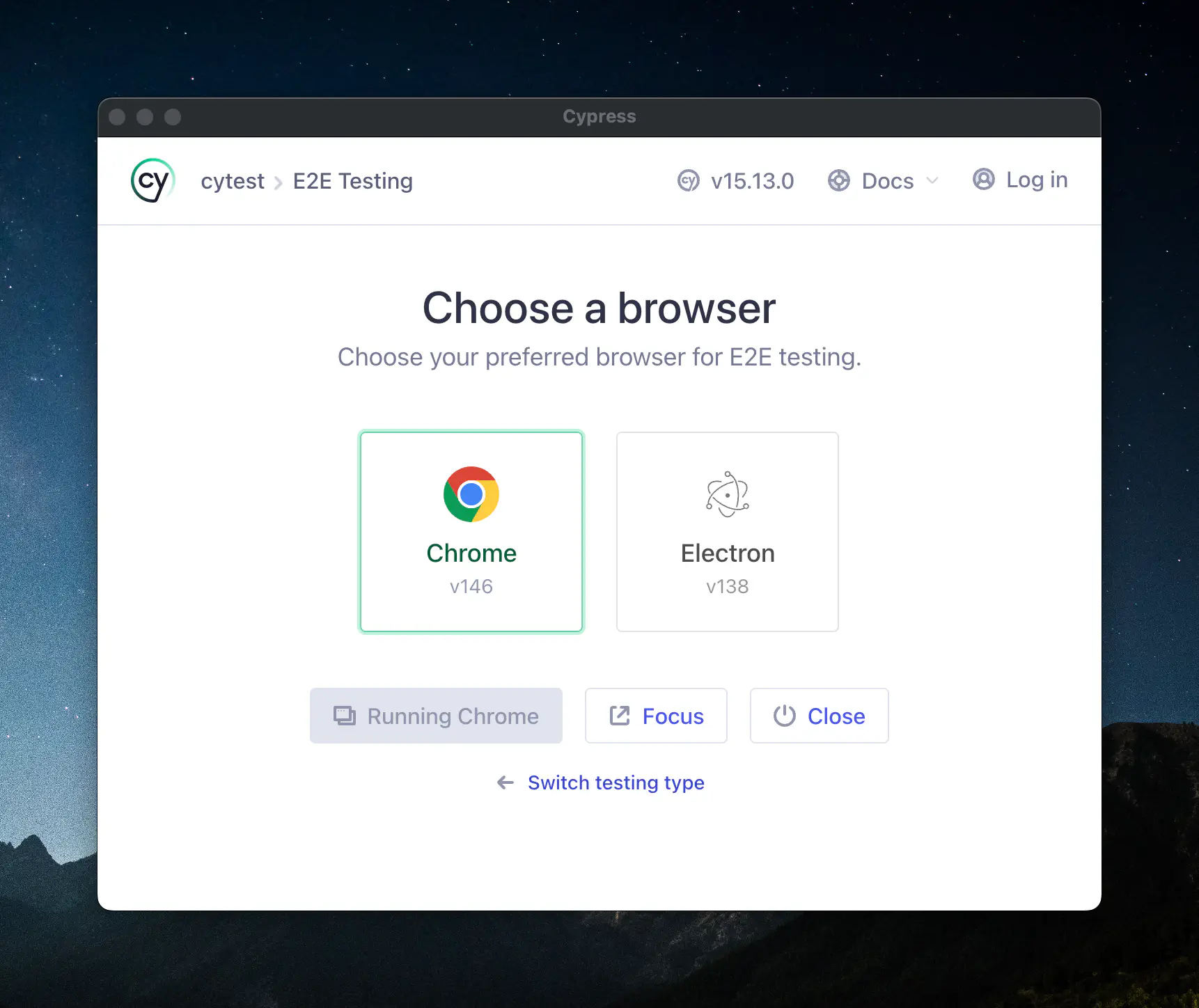
For example, when you run npx cypress open, it opens up a new Cypress launcher. This is the Cypress Electron app (which also hosts Node.js server and proxy):
Test driver & AUT
After Cypress app initializes in the browser, it loads two iframes:
- Test driver: Executes the
cytest code - App under test (AUT): User application being tested.
Cypress internally uses Mocha as the test runner (where .describe() and .it() API are from). For element selectors, it uses jQuery.
Although the Test driver iframe runs the test code, it isn’t executed synchronously. The test driver implements its own runtime where tasks are enqueued and executed asynchronously (this is well documented in the doc).
Why does it use iframe in the first place? From what I can find online, it’s a product of history. Selenium 1 originally used a similar iframe injection architecture, but migrated to using WebDriver Classic (predecessor of CDP - Chrome DevTools Protocol) in Selenium 2. WebDriver Classic serialized every DOM interaction into an HTTP request/response cycle, which was a performance bottleneck. Cypress extended the original <iframe> architecture with a goal to reduce check-and-act cycle latency.
Normally, iframes with different origins can’t interact with each other due to the same-origin policy. Cypress works around this by overwriting the origin of all three windows to be the same: app, test driver, and AUT.
Demo: cy.visit()
Here’s a simple Cypress test that visits google.com:
describe('Cypress demo', () => {
  it('passes', () => {
    cy.visit('https://google.com')
  })
})
When I run it locally within the Cypress App, here’s the output:
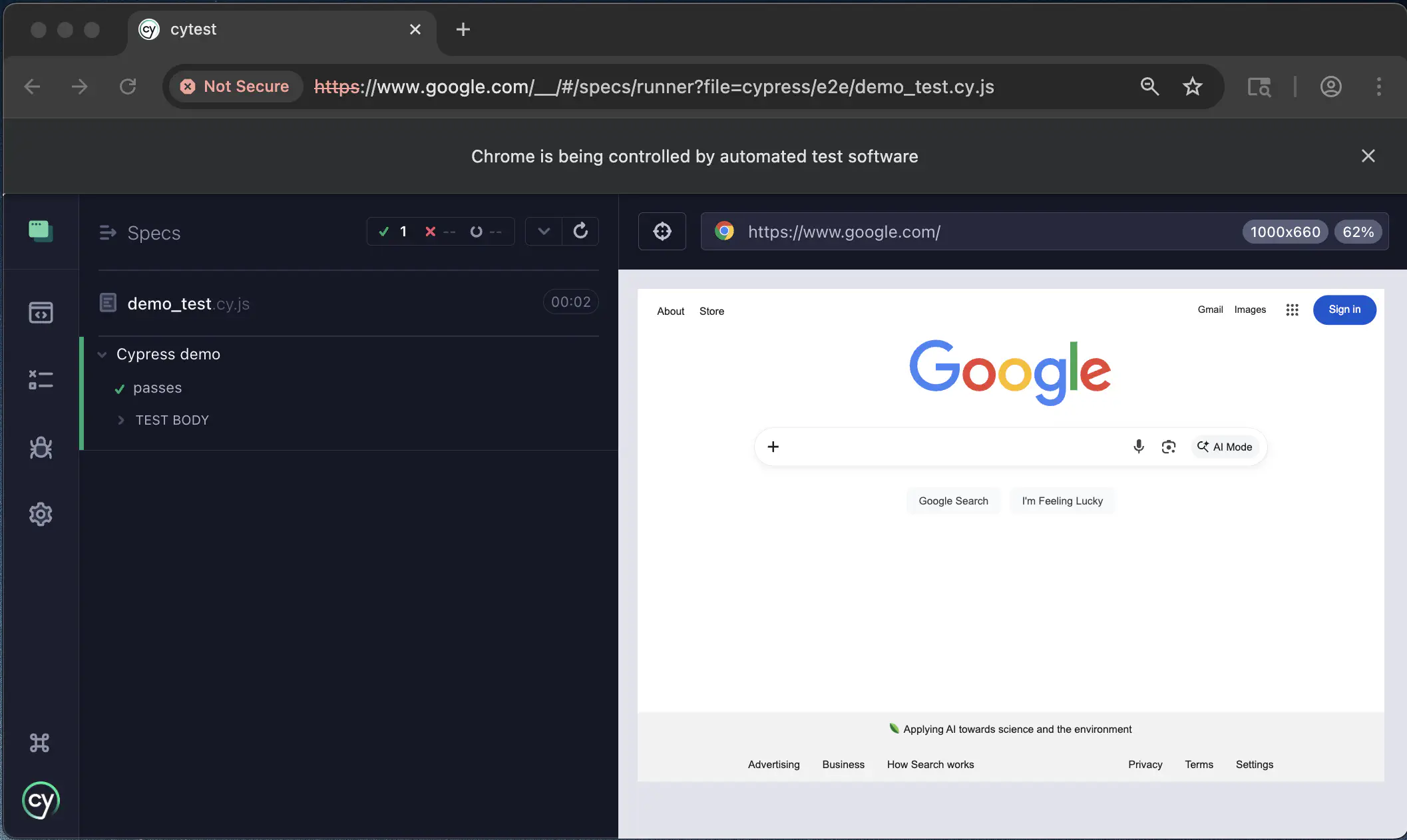
All windows share the same origin:
// In Chrome Dev Tools
// ----------------------------
console.log(window.location.origin)
// 'https://www.google.com' (Cypress App)
document.querySelectorAll('iframe').forEach((iframe) => {
    console.log(iframe.contentWindow.location.origin)
})
// 'https://www.google.com' (AUT)
// 'https://www.google.com' (Test driver)
Proxy & Protocols
All HTTP requests from the browser are intercepted by the proxy. The proxy distinguishes between the Cypress App requests and AUT requests by an X-Cypress-Is-AUT-Frame HTTP header. This enables commands like cy.intercept:
// spying and response stubbing
cy.intercept('POST', '/users*', {
  statusCode: 201,
  body: {
    name: 'Satoru Gojo',
  },
})
The way Cypress uses WebSocket and CDP is interesting but under-documented:
- WebSocket is used for tasks that specifically require the Server like
cy.task()andcy.exec(). - CDP is used for the proxy. Cypress listens for the
Fetch.requestPausedevent then adds the AUT HTTP header appropriately. This is done in the CDP layer since the request source is distinguished by theframeId(code):
client.on('Fetch.requestPaused', async (params) => {
    if (await this._isAUTFrame(params.frameId)) {
      return this._continueRequest(client, params, {
        name: 'X-Cypress-Is-AUT-Frame',
        value: 'true',
      })
    }
    return this._continueRequest(client, params)
  })
Then there are operations where it uses both WebSocket and CDP. For example, when there’s a call like cy.screenshot():
- Test Driver dequeues the
cy.screenshot()step - Test Driver sends a request via WebSocket to the server
- Server sends a
Page.captureScreenshotCDP request to the browser
Demo: Proxy
Running ps aux during a Cypress test shows Chrome with a proxy configured:
/Applications/Google Chrome.app/Contents/MacOS/Google Chrome --proxy-server=http://localhost:50452 ...
This port is the one the Cypress server uses:
$ lsof -i:50452
COMMAND     PID    USER   FD   TYPE             DEVICE SIZE/OFF NODE NAME
Cypress   62976 atsushi   90u  IPv4 0xd1adfce843966189      0t0  TCP localhost:50452 (LISTEN)
$ ps -p 62976
  PID TTY           TIME CMD
62976 ttys004    0:05.51 /Users/atsushi/Library/Caches/Cypress/15.13.0/Cypress.app/Contents/MacOS/Cypress ...
Playwright Architecture
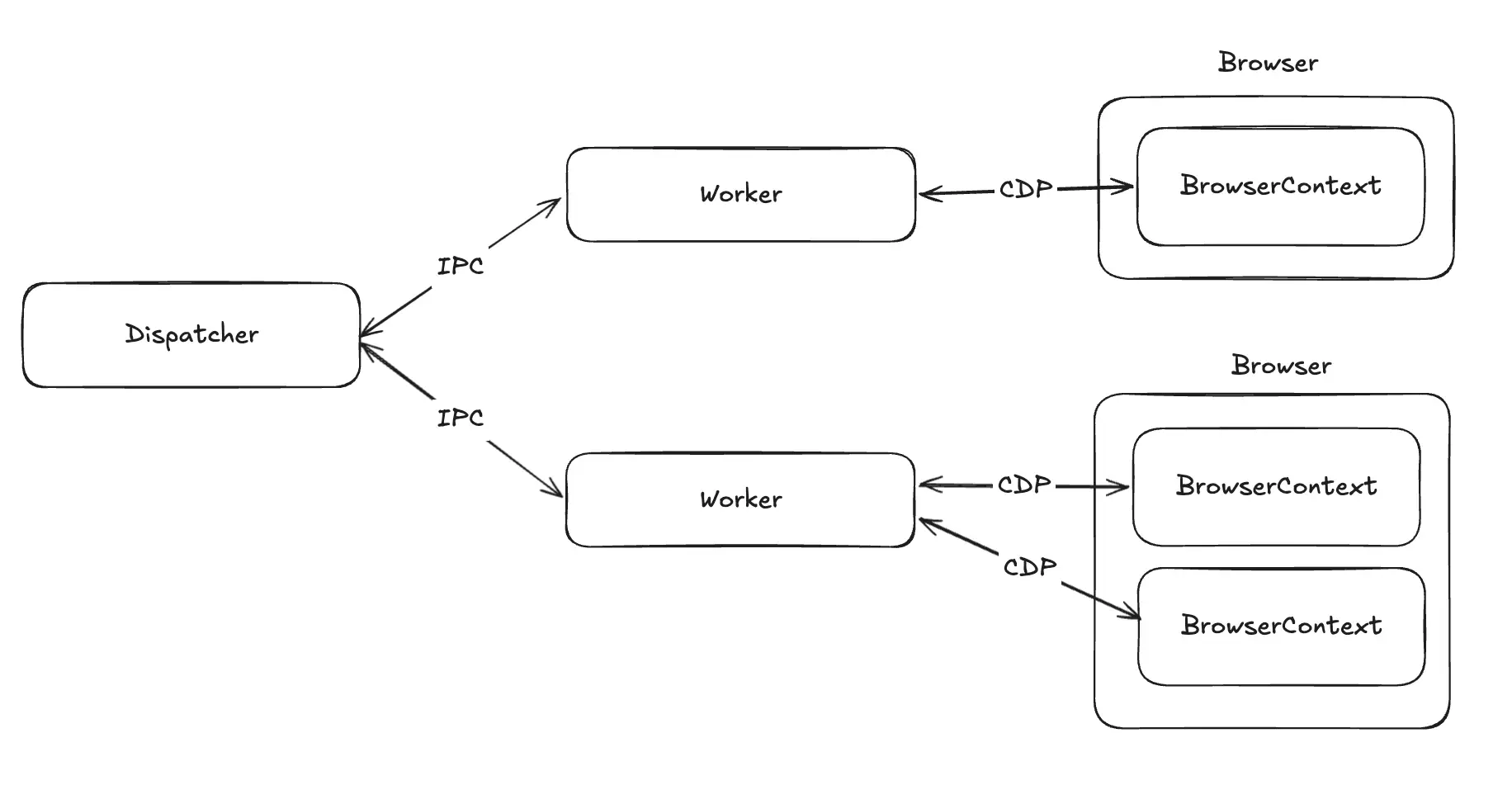
Playwright’s architecture is simpler compared to Cypress (based on v1.59.1). When you’re running tests in a single machine, these are roughly the three components:
- Dispatcher: The main process that orchestrates the whole workflow
- Worker: Forked from Dispatcher, and executes the tests
- BrowserContext: Manages independent browser sessions, each with its own state (e.g. localStorage)
Dispatcher and Worker communication is done with the JSON-RPC over the Node.js process events. Many articles mention that Playwright uses WebSocket for worker orchestration, but this only applies to the client-server use case. Workers control browser sessions using CDP for Chrome, and Playwright’s own protocol implementations for Firefox and WebKit.
Worker both executes the test code and maintains the CDP connections. It serializes the test code to CDP as it executes sequentially via async/await.
Architecture comparisons
Performance
Many articles claim that Playwright is more performant than Cypress. Cypress has more overhead: Electron, a proxy, and iframes. It also bundles Mocha for tests, jQuery for DOM queries, Vue.js for the in-browser Cypress App, Bluebird for Promises, Webpack, and probably more. The Cypress App is rendered in headless mode unless you disable it with --no-runner-ui.
Playwright executes much less JavaScript on top of relying entirely on CDP for browser interactions. The biggest performance gain would come from sharding & single-machine parallelization (using BrowserContext and storageState).
Flakiness
Many articles claimed that Playwright is less flaky, but this is more of a nuanced discussion.
Cypress has the retry-ability feature, but so does Playwright. Similarly, Playwright’s auto-wait gets lots of praise, but Cypress also has a similar ensure feature in the code. In general, the real risk of flakiness depends mostly on how the test code is written.
With that being said, debugging flaky tests seems substantially easier with Playwright. It can produce a self-contained .zip trace file capturing network, console, and DOM snapshots that AI can consume easily. This would be helpful for investigating flaky CI test cases, particularly with tools like its MCP server and CLI being available.
Conclusion
For E2E testing, Playwright seems like a better fit for my use cases. Cypress’s iframe and command-queue model predates async/await, and it prioritizes interactive debugging over headless CI. The divergence also feels like a difference in product strategy since many useful features are only available through their Cloud service, whereas Playwright is fully open-source.
This research took around a week, but I have a much better clarity on the similarities and differences. Let me know if you found this useful or noticed something wrong!
Resources
- “Closer to the Metal: Leaving Playwright for CDP” - good overview of browser automation history
- “The multi-year quest for the best web test in the west” - talk by one of the creators of Playwright
- “Cypress: The future of E2E testing” - video from 2018 when Cypress was first introduced