Bazel Skyframe explained
The term “Skyframe” comes up often as you dig deeper into Bazel internals. However, the available explanations are pretty confusing and I found myself re-reading the Skyframe documentation multiple times. I’ve looked around the source code just enough to get the essence of it, so this post summarizes what I’ve learned.
We’ll explore what Skyframe is and how it’s implemented (at a very high level). Basic Bazel knowledge is assumed. For the sake of simplicity, we’ll just walk through the local machine worker scenario (no RBE).
After reading this post, you should understand why the total action count gradually increases from 1 as the build progresses!

Disclaimer: I’ll be sharing a simplified model that hopefully helps build an intuition about the internals, but the actual implementation is much more detailed. It’s done this way since 1. I don’t understand every knob in the system yet and 2. I figured it’ll be overwhelming for an intro post.
Introduction
Skyframe is a parallel and incremental evaluation engine. Let’s break this down phrase by phrase.
Evaluation engine
BUILD files establish explicit DAG relationships between build targets. The framework walks the graph and builds in an efficient order.
Incremental
Each node in the DAG is evaluated step by step, and the result is cached. Bazel has mechanisms to determine what changed since the last build and only rebuild those. In other words, the 2nd build is “incremental” relative to the cache of the 1st build.
Parallel
Building targets sequentially is not an option for large-scale builds, so Skyframe evaluates independent nodes in parallel.
Let’s look at a hello world example to explore this further.
Repo setup
I prepared a demo Bazel repo here: https://github.com/jumbosushi/bazel-hello-world-c
The only BUILD.bazel builds a cc_binary target that depends on a few files:
load("@rules_cc//cc:cc_binary.bzl", "cc_binary")
load("@rules_cc//cc:cc_library.bzl", "cc_library")

cc_library(
    name = "lib",
    srcs = ["lib.c"],
    hdrs = ["lib.h"],
)

cc_binary(
    name = "hello",
    srcs = ["hello.c"],
    deps = [":lib"],
)
Here’s what it looks like when you run it:
$ bazel run //:hello
INFO: Analyzed target //:hello (89 packages loaded, 534 targets configured).
INFO: Found 1 target...
Target //:hello up-to-date:
  bazel-bin/hello
INFO: Elapsed time: 1.460s, Critical Path: 0.22s
INFO: 14 processes: 10 internal, 4 darwin-sandbox.
INFO: Build completed successfully, 14 total actions
INFO: Running command line: bazel-bin/hello
Hello World!
Skyframe DAG is available from the following command:
bazel dump --skyframe deps
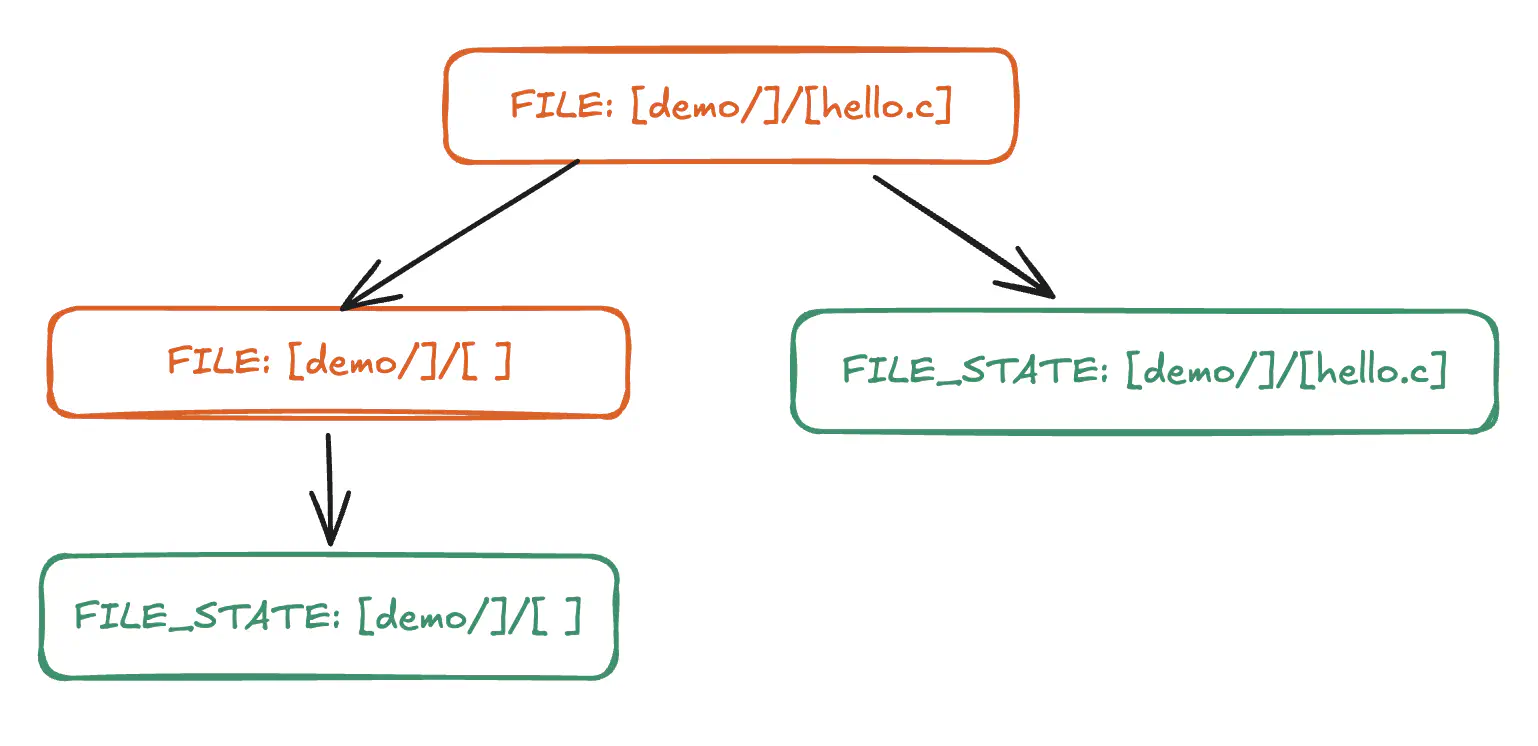
Even in this hello world example, the dump file is >60K lines. To make it more manageable, we’ll be using this subset of the graph that’s related to reading local files (starting with FILE) to walk through how Skyframe might execute it:
Architecture overview
The way I understand it, Skyframe execution roughly consists of three components that use standard Java classes at their core:
- Evaluator: Orchestrates the whole Skyframe build lifecycle
- Graph: DAG of build targets & dependencies (implemented with
ConcurrentHashMap) - Executor: Executes the actual computation of nodes in parallel (implemented with
ExecutorService)

Each node in the graph wraps a SkyValue and is referenced by a SkyKey. The Evaluator uses the SkyKey’s associated pure function (called a SkyFunction) to build the SkyValue. Every type of computation done by Skyframe is implemented as a SkyFunction (there are more listed here as of v9.0.0).
The simplest SkyFunction I found was FileStateFunction, which essentially returns file metadata. To map to the definitions:
- SkyKey:
"FILE_STATE:[demo/]/[hello.c]"(a pair of type & name) - SkyValue: metadata for
demo/hello.c(file type, size, and a content digest) - SkyFunction:
FileStateFunction
A SkyFunction can also call other SkyFunctions (e.g. FILE calls FILE_STATE in our subgraph). In fact, when we call bazel build //..., Bazel passes the //... pattern to TargetPatternPhaseFunction during the loading phase, which is the starting point for recursively constructing the DAG.
Evaluation model
Each build target and its dependencies are represented as DAG nodes. We’ll walk through the evaluation in a simplified mental model.
A node can be in one of three states: READY, WAITING, and DONE. Each node also has a counter tracking how many of its dependencies have completed, which determines state transitions. When the counter reaches the total number of dependencies, the node is considered READY. The Evaluator enqueues the READY nodes to the Executor, then the Executor runs the node’s SkyFunction .compute() method. The state then transitions to DONE after the .compute() call returns. Here’s an interactive walk-through to see how the state transitions:
Step-through animation of Skyframe evaluation showing FILE and FILE_STATE nodes with state, dependency counters and parents, alongside the evaluator queue and executor running compute().
The interesting behavior in Skyframe is the “restart”. On a first pass, a node might be evaluated but it may need to wait for its dependency to be evaluated first (e.g. a symlink target needs to be resolved before the symlink itself). In this case, Skyframe sets the parent node state to WAITING. When the dependency’s state transitions to DONE, the Evaluator uses the reverse dependency edge to “signal” the parent, which increments the dependency counter. When the counter reaches the total number of dependencies, the parent node is enqueued again. Eventually, the parent node will “restart” and be evaluated again with complete dependencies available to run its own .compute step.
This part is complicated! Let’s try to examine this behavior in a small code sample.
Simplified Python code
I created a skyframe.py gist that emulates the Skyframe execution model in a minimal way. From the example above, let’s examine how a sub-graph from the FILE node might be evaluated (in a single-threaded environment) using this code:
============================================================
Evaluating FileKey
============================================================
      enqueued FILE:demo/hello.c
[1] FILE:demo/hello.c  [dequeued]
      enqueued FILE:demo/
      enqueued FILE_STATE:demo/hello.c
      -> FILE:demo/hello.c is WAITING
      waiting on 2 deps: [FILE:demo/, FILE_STATE:demo/hello.c]
[2] FILE:demo/  [dequeued]
      enqueued FILE_STATE:demo/
      -> FILE:demo/ is WAITING
      waiting on 1 deps: [FILE_STATE:demo/]
[3] FILE_STATE:demo/hello.c  [dequeued]
      done: FileStateValue('demo/hello.c', size=12, digest='0x6adc317e9a1f8e3a')
      signal FILE:demo/hello.c (1/2 done)
[4] FILE_STATE:demo/  [dequeued]
      done: FileStateValue('demo/', size=5, digest='0x7a2c1fe5df50d1df')
      signal FILE:demo/ (1/1 done)
      -> FILE:demo/ is READY (enqueued)
[5] FILE:demo/  [dequeued]
      done: FileValue('demo/')
      signal FILE:demo/hello.c (2/2 done)
      -> FILE:demo/hello.c is READY (enqueued)
[6] FILE:demo/hello.c  [dequeued]
      done: FileValue('demo/hello.c')
Notice that on Step 6, File:demo/hello.c restarted after its dependencies were available. The restart behavior is also visible in the Python Evaluator class:
# Code snippet from the python gist without the noise
class Evaluator:
    def evaluate(self, key: SkyKey) -> SkyValue | None:
        while self.queue:
            ...
            env = Environment(self.graph, self.queue, key)
            result = self.executor.run(key, env)

            node = self.graph.nodes[key]

            # .compute was successful
            if result is not None:
                node.value = result
                node.state = Node.DONE

                for parent in node.reverse_deps:
                    parent_node = self.graph.nodes[parent]
                    parent_node.completed_deps += 1

                    if parent_node.completed_deps == parent_node.total_deps:
                        parent_node.state = Node.READY
                        self.queue.append(parent)
            else:
                node.total_deps = len(env._new_deps)
                node.completed_deps = 0
                node.state = Node.WAITING
This evaluation model also explains why the action count in the CLI grows from 1 to a much bigger number during the execution phase. Skyframe doesn’t have any idea of what the entire DAG looks like at first, but it generates the DAG via SkyFunctions and follows the edges to recursively evaluate nodes while updating total action count in the CLI.
Caching
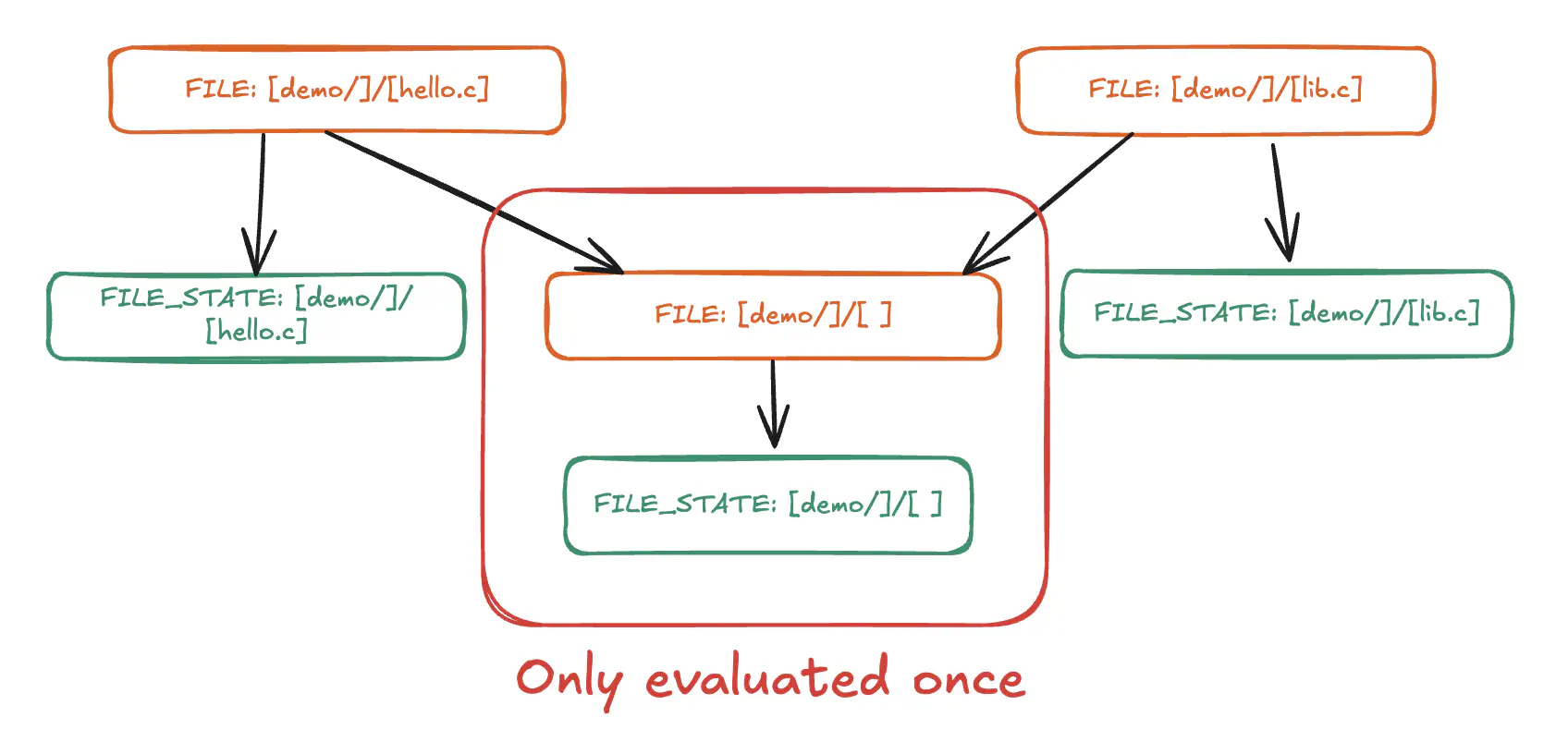
Because SkyKey is immutable and available globally in the graph, the same computation only executes once. In the following sub-graph, the FILE:demo/ node (which represents a directory) has two incoming edges. Once its computation is done, parent nodes reuse the same SkyValue result.
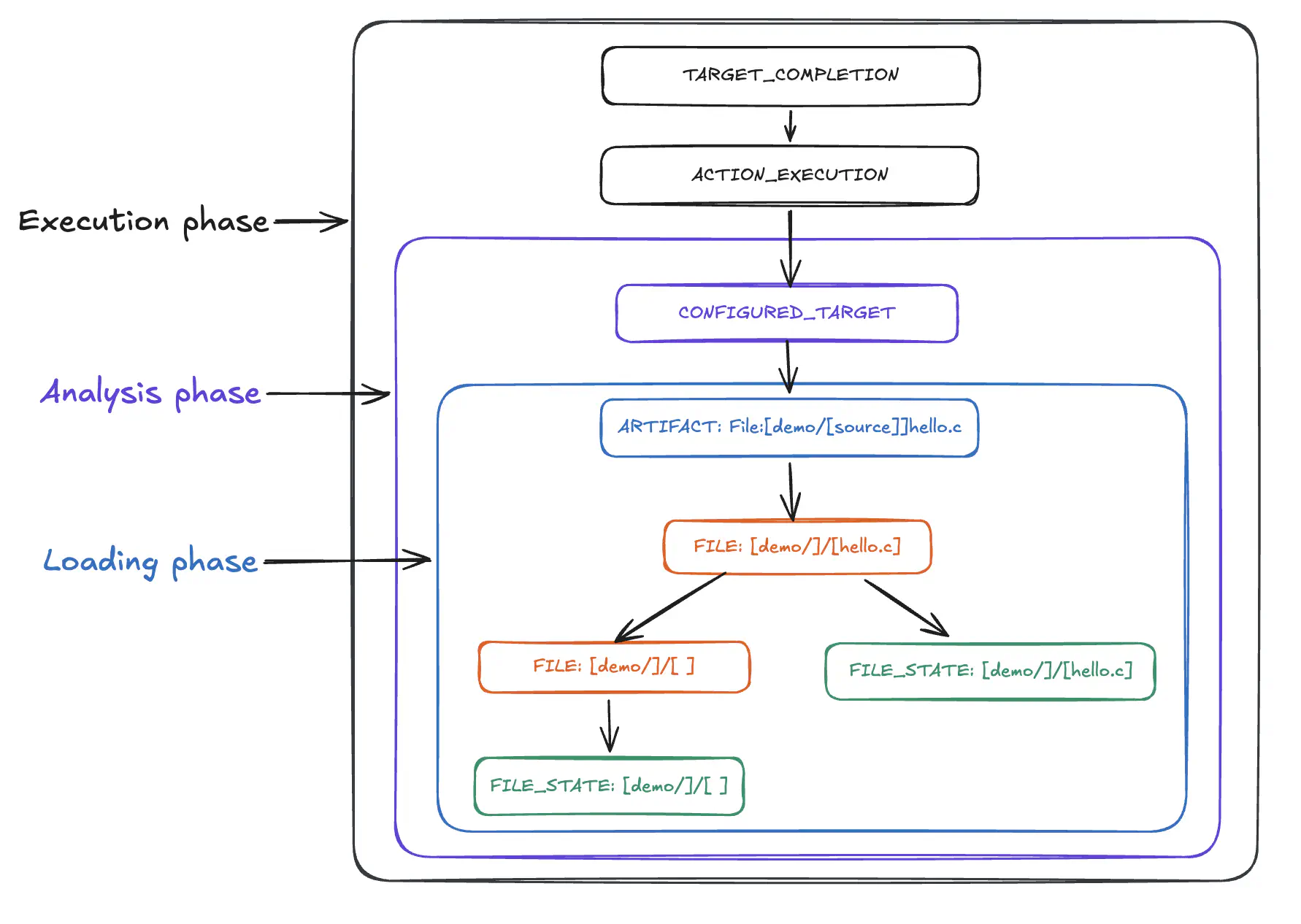
As mentioned earlier, each of Bazel’s execution phases has a corresponding SkyFunction:
- Loading: TargetPatternPhaseFunction
- Analysis: ConfiguredTargetFunction
- Execution: TargetCompletionFunction
Each phase builds on top of the previous phase’s Skyframe nodes. Because they share the same global graph, the cache is reused across phases as well (e.g. reading hello.c from the filesystem only once). Here’s a rough version of how each phase might create different Skyframe nodes:
Incrementality
The Skyframe evaluation cache is also reused beyond a single build! Bazel persists the Skyframe state in its server, which is used across different client build invocations. It then sets up a file system watcher for local filesystems (using inotify on Linux and fsevents on macOS) when it’s enabled with the --watchfs flag.
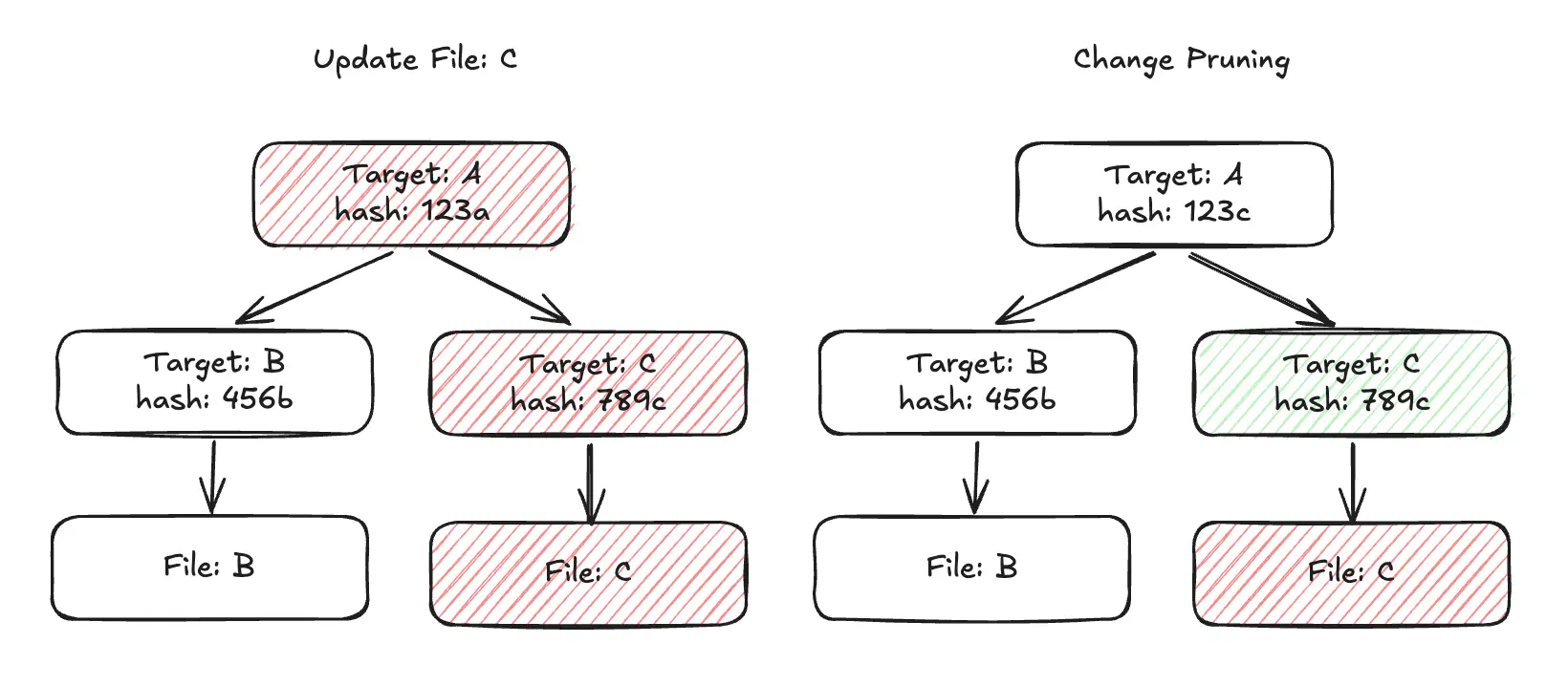
The server keeps track of file edit status in order to implement “change pruning”. When a file is updated, Bazel marks the changed leaf FileState node as CHANGED. The state change is propagated up the reverse dependencies, but they are instead marked as DIRTY. During the bottom-up re-evaluation, the CHANGED node is evaluated first. If the output is identical (e.g. same SHA), re-evaluation exits early at nodes marked DIRTY and skips .compute().
For example, this is what the initial build with --subcommands flag looks like for our C example:
$ bazel build --subcommands //...
SUBCOMMAND: # cc_library rule target //:lib [action 'Compiling lib.c', configuration: 680dcaf1caca59c28bd4314128d3f53c6fa1ff268a38933011ddb444ea1ec37b, execution platform: @@platforms//host:host, mnemonic: CppCompile] ...
INFO: Analyzed 2 targets (89 packages loaded, 534 targets configured).
SUBCOMMAND: # cc_binary rule target //:hello [action 'Compiling hello.c', configuration: 680dcaf1caca59c28bd4314128d3f53c6fa1ff268a38933011ddb444ea1ec37b, execution platform: @@platforms//host:host, mnemonic: CppCompile] ...
SUBCOMMAND: # cc_library rule target //:lib [action 'Linking liblib.a', configuration: 680dcaf1caca59c28bd4314128d3f53c6fa1ff268a38933011ddb444ea1ec37b, execution platform: @@platforms//host:host, mnemonic: CppArchive] ...
SUBCOMMAND: # cc_binary rule target //:hello [action 'Linking hello', configuration: 680dcaf1caca59c28bd4314128d3f53c6fa1ff268a38933011ddb444ea1ec37b, execution platform: @@platforms//host:host, mnemonic: CppLink] ...
INFO: Found 2 targets...
INFO: Elapsed time: 1.498s, Critical Path: 0.22s
INFO: 14 processes: 10 internal, 4 darwin-sandbox.
INFO: Build completed successfully, 14 total actions
Notice that it ran four compiler & linker subcommands. Next, I’ll update the C file to include a comment that will change the file node’s state to CHANGED:
   #include <stdio.h>
   #include "lib.h"

++ // Test
   int main(void) {
       printf("%s!\n", greeting());
       return 0;
   }
When I build again, the change pruning kicks in. The cc_binary action to compile hello.c runs and produces the same binary since the C compiler strips comments before compilation. Once Skyframe verifies that the build output is the same, it reuses the build output from the cache:
$ bazel build --subcommands //...
INFO: Analyzed 2 targets (0 packages loaded, 0 targets configured).
SUBCOMMAND: # cc_binary rule target //:hello [action 'Compiling hello.c', configuration: 680dcaf1caca59c28bd4314128d3f53c6fa1ff268a38933011ddb444ea1ec37b, execution platform: @@platforms//host:host, mnemonic: CppCompile] ...
INFO: Found 2 targets...
INFO: Elapsed time: 0.159s, Critical Path: 0.07s
INFO: 2 processes: 1 action cache hit, 1 internal, 1 darwin-sandbox.
INFO: Build completed successfully, 2 total actions
Note that this dirtiness state is tracked separately from the evaluation state we saw earlier (e.g. WAITING). If you’re curious, this blog post covers file change detection in more depth.
Conclusion
Hopefully this gives you an overview of Skyframe, but I can’t emphasize enough that this only scratches the surface. Some sources of complexity are:
- Build performance improvements with Skymeld
- Optimizing memory usage with Skyfocus
- Reducing node restarts with StateMachines
With that said, doing this research helped me build a basic intuition for how Skyframe works. I feel more confident keeping up with the latest changes in Bazel internals.
References
BuildTool.javais “crux of the build system” and is a great starting point to dig into the Bazel build process internals.AbstractParallelEvaluator.javamanages the DAG node statesAbstractInMemoryNodeEntry.javaimplements the DAG node classSkyframeExecutor.javais the main wrapper class that drives the SkyFrame executionsLocalDiffAwareness.javasets up the file system watcher- All SkyFunctions are in
src/main/java/com/google/devtools/build/lib/skyframedirectory within the Bazel repository